What Is BNK/RC.CYCLER.SERVICE.SOD in Temenos T24? A Complete Guide
Introduction
Temenos T24, now commonly known as Temenos Transact, uses background services and Close of Business (COB) routines to process banking operations. Some of these processes handle transactions that could not be completed successfully during an earlier attempt.
One service name you may encounter while working with T24 operations is BNK/RC.CYCLER.SERVICE.SOD.
Understanding this service is useful for T24 developers, production support analysts, core banking consultants, and banking operations teams because it relates to the processing of pending transactions through the Transaction Recycler framework.
In this guide, we will explain what the service name likely represents, how the Transaction Recycler works, why SOD processing matters, how it relates to EOD, and what you should investigate when a transaction remains pending.
New to the platform? Start with What Is Temenos T24? A Beginner's Guide to Core Banking.
1. What Is BNK/RC.CYCLER.SERVICE.SOD in T24?
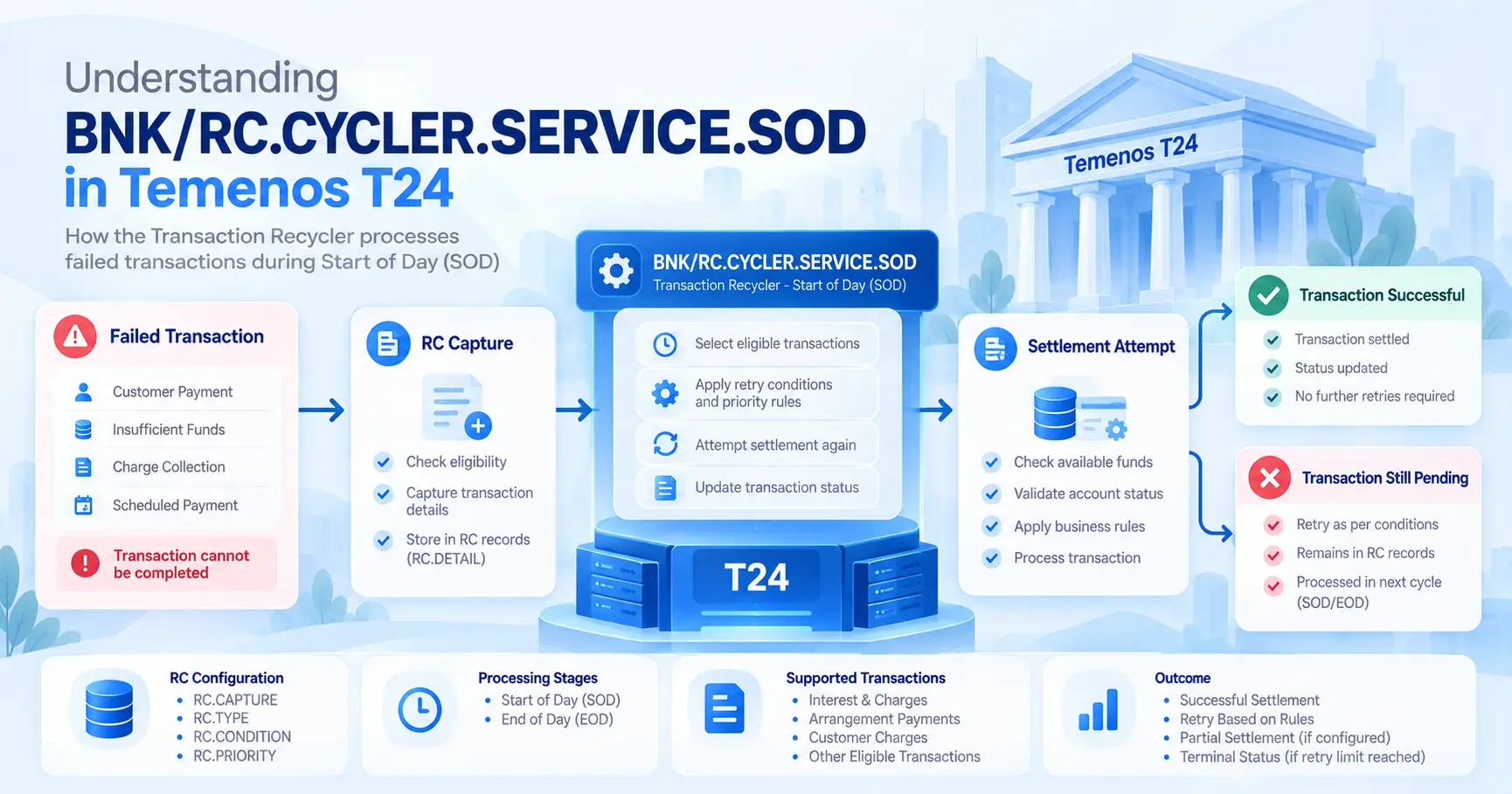
BNK/RC.CYCLER.SERVICE.SOD appears to refer to the Start of Day execution of the Transaction Cycler service in a T24 environment.
The key documented component is RC.CYCLER.SERVICE. In T24, the Transaction Recycler framework can capture eligible financial transactions that cannot be completed and retry them according to configured conditions.
The .SOD suffix indicates a Start of Day context. However, the exact interpretation of the BNK/ prefix and the complete job identifier should be verified against the bank's local configuration and COB job setup.
Breaking down the service name
| Component | Likely meaning |
|---|---|
BNK/ | Environment-specific prefix or namespace; confirm locally |
RC | Transaction Recycler module |
CYCLER | Processing mechanism for retrying eligible pending transactions |
SERVICE | Background service or processing routine |
SOD | Start of Day processing stage |
The name alone does not establish the precise selection criteria, configuration, or business transactions processed in a particular installation.
What does the service do?
At a high level, the documented Transaction Cycler framework retries eligible transactions that have previously failed or could not be completed. It uses configured retry rules and transaction details to determine what should be processed.
For example, a charge may be due on a customer account, but the account may not have sufficient funds. If the transaction is eligible for recycling and the required configuration is in place, the framework may attempt settlement again at a configured retry opportunity.
This does not mean every failed transaction is automatically retried. Eligibility, retry conditions, transaction status, and application-specific processing all matter.
2. What Is the Transaction Recycler (RC) Module?
The Transaction Recycler, commonly abbreviated as RC, is a framework in T24 for managing eligible transactions that need another attempt at processing.
Instead of treating every eligible failed transaction as permanently unsuccessful, the system can retain the necessary transaction details and retry it according to configured rules.
The framework is particularly relevant to scenarios involving outstanding payments, interest, charges, and certain arrangement-related transactions. Public T24 training material describes support for relevant Interest and Charges (IC) and Arrangement Architecture (AA) scenarios, with exact capabilities depending on the release and configuration.
Why is transaction recycling useful?
Banks regularly encounter situations in which a transaction cannot be completed at the first attempt. Common examples include:
- Insufficient funds in a settlement account
- An outstanding charge that cannot currently be collected
- A scheduled payment that requires another settlement attempt
- A transaction affected by a posting restriction or locked funds
- An eligible transaction handed over to the recycler by another T24 application
The recycler provides a controlled mechanism for retrying supported transactions rather than relying exclusively on manual intervention.
3. How Does RC.CYCLER.SERVICE.SOD Work?
The precise processing sequence can differ by release and configuration, but the general concept can be understood through the following flow.
Step 1: A transaction becomes eligible for recycling
A supported application or configured process identifies a transaction that cannot be completed and makes it eligible for the recycler framework.
Step 2: The transaction details are retained
The recycler maintains information about the transaction, its settlement account, applicable retry conditions, and processing status.
Step 3: The cycler processes eligible transactions
During the applicable processing stage, the service selects eligible pending items and applies the relevant validation and prioritisation rules.
Step 4: Settlement is attempted again
The system attempts to complete the transaction under the configured conditions. Whether full or partial settlement is permitted depends on the relevant configuration and transaction type.
Step 5: The processing outcome is recorded
The transaction's status and retry information are updated according to the framework's processing rules. Successful transactions stop requiring further retries; other transactions may remain pending, fail again, or reach a terminal status.
A simplified conceptual flow is:
Customer Transaction → Initial Processing Failure → Recycler Eligibility Check → Retry Conditions and Prioritisation → SOD/EOD Processing → Settlement Attempt → Updated Transaction Status
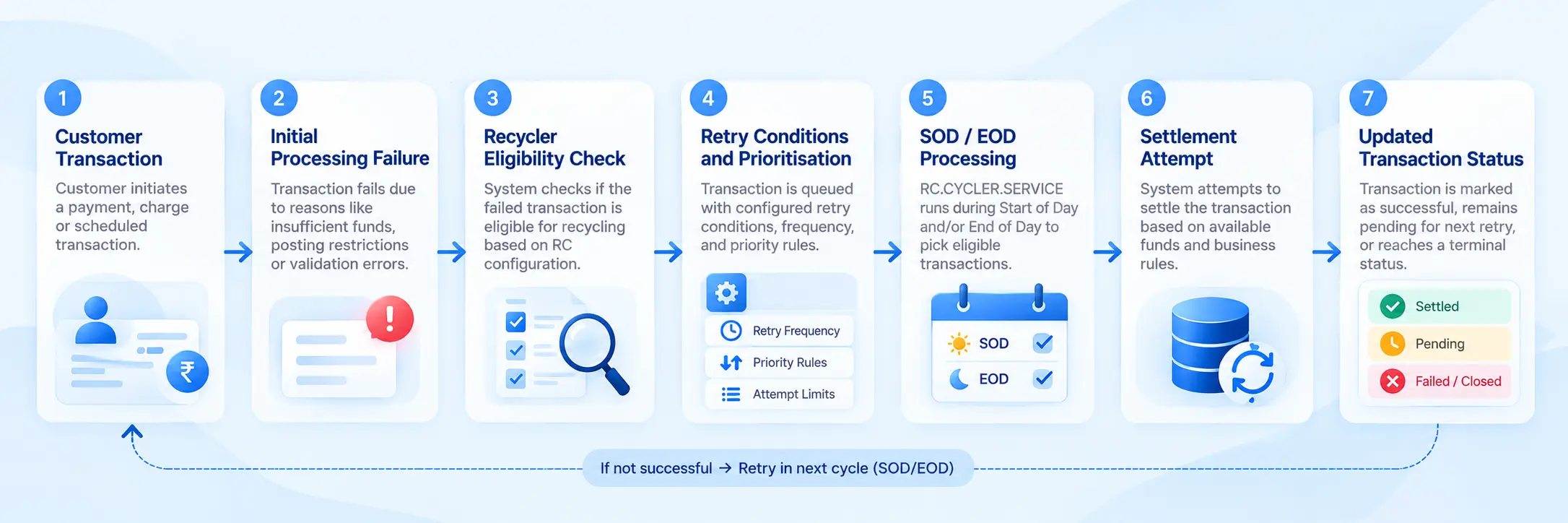
This is a conceptual illustration, not a guaranteed internal execution sequence for every T24 release.
4. What Is SOD Processing in Temenos T24?
SOD stands for Start of Day.
It refers to the processing stage associated with preparing the banking system for the new business day. The exact sequence of activities depends on the bank's operating model, COB configuration, and implementation.
A bank may configure particular services to run during SOD, EOD, or both stages.
For the Transaction Recycler, public T24 training documentation describes the RC.CYCLER.SERVICE job as operating during both Start of Day and End of Day processing in applicable setups.
This means SOD processing can provide a retry opportunity for eligible transactions that remain outstanding.
Example
Imagine a customer has an outstanding eligible charge of ₹500.
At an earlier attempt, the account does not have sufficient funds to settle the charge. The transaction is retained under the applicable recycler rules.
Later, the account receives sufficient funds. Depending on the configuration and processing route, the recycler may attempt settlement during a subsequent processing opportunity.
The important point is that SOD is a processing stage, not a guarantee that every outstanding transaction will be settled.
5. What Is the Difference Between SOD and EOD in Transaction Recycling?
SOD and EOD identify different stages in the banking-day processing cycle.
| Aspect | SOD | EOD |
|---|---|---|
| Full form | Start of Day | End of Day |
| General role | Processing associated with starting the banking day | Processing associated with closing the banking day |
| Recycler relevance | May retry eligible pending transactions | May retry eligible pending transactions |
| Outcome | Depends on eligibility, rules, and available funds | Depends on eligibility, rules, and available funds |
Both stages can be relevant to transaction recycling, depending on the bank's setup.
Do not assume that a transaction receives a fixed number of retries simply because the service runs in both stages. Retry frequency, attempt counting, and termination conditions are governed by the applicable configuration and processing logic.
6. What Types of Transactions Can the Recycler Process?
The RC framework is not a universal retry mechanism for every failed transaction in T24. The relevant application, transaction type, handoff configuration, and retry conditions determine eligibility.
Examples in documented T24 training material include the following.
Interest and Charges (IC)
An interest or charge collection may fail because the customer account cannot support the required debit.
Where recycling is enabled and the transaction meets the applicable conditions, the framework can retry settlement.
Arrangement Architecture (AA)
Certain eligible arrangement-related transactions, including applicable bill settlement scenarios, can use the recycler framework.
The precise behaviour depends on the product, arrangement configuration, and supported processing route.
Other eligible transactions
Other T24 applications may hand transactions to the recycler when supported by the relevant implementation.
For this reason, it is important to check the transaction's originating application and configuration rather than assuming that all failed payments are handled by RC.
7. Important RC Configuration Components
Understanding the main RC configuration records helps developers and support analysts investigate why a transaction is or is not being retried.
The following are commonly discussed components in T24 Transaction Recycler documentation. Availability, field definitions, and exact behaviour may vary by release.
| Component | General purpose |
|---|---|
RC.CAPTURE | Defines eligible accounting entries or application conditions for capture |
RC.TYPE | Defines relevant core and local processing routines for transaction types |
RC.CONDITION | Holds retry conditions such as frequency, attempts, or retry period |
RC.PRIORITY | Defines prioritisation at the relevant system or company level |
RC.PRODUCT.PRIORITY | Helps determine product-level ordering |
RC.CONTRACT.PRIORITY | Supports prioritisation among applicable contracts or arrangements |
RC.DETAIL | Holds information about transactions captured or handed over to the recycler |
RC.DETAIL.HIST | Can retain historical details where history writing is configured |
These records should be examined in the context of the bank's specific release and implementation.
Why do these records matter?
Suppose a charge remains outstanding even though the cycler service ran successfully.
The service execution alone does not prove that the transaction was eligible for retry. The relevant capture configuration, retry condition, transaction status, settlement account, and prioritisation rules may all influence the outcome.
A correct investigation therefore examines the transaction and its configuration together.
8. How Does the Cycler Handle Insufficient Funds?
Consider this example: a customer has an outstanding eligible charge of ₹1,000, but the account has only ₹300 available.
The outcome depends on the applicable retry and settlement configuration. Possible behaviours include:
- The transaction remains outstanding until a later retry.
- Partial settlement is attempted if permitted by the configuration.
- The transaction is retried at a configured interval.
- The retry process stops after the configured limit or period.
- The transaction is no longer processed if it reaches a terminal status or is settled through another route.
Not all of these outcomes apply to every transaction type. In particular, partial settlement is configuration-dependent and should not be assumed for all applications.
What if the account receives money later?
In applicable implementations, the RC framework can also support online retry triggers. Public training material describes triggers associated with events such as a credit being posted to the settlement account, removal of a posting restriction, or unlocking funds.
This behaviour is distinct from a scheduled SOD or EOD run. Whether an online retry occurs depends on the implementation and the relevant configuration.
9. What Should You Check If RC.CYCLER.SERVICE.SOD Does Not Process a Transaction?
If an eligible transaction remains pending, investigate the following areas systematically.
1. Confirm the service execution
Check the relevant COB or batch logs to establish whether the expected service ran in the correct stage. Look for the actual job name, execution status, timestamps, and error details.
2. Verify that the transaction is eligible
Check the originating application, transaction type, and applicable recycler capture conditions. A transaction may be unsuccessful without being eligible for RC processing.
3. Inspect retry conditions
Review the configured retry frequency, attempt limits or retry period, and any other conditions applicable to the transaction. A transaction that has exhausted its permitted retry window may not be processed again.
4. Check the transaction status
Inspect the transaction's current status and processing history. Determine whether it is still eligible, has already completed, was rejected, or was terminated.
5. Review settlement account conditions
Check available funds, posting restrictions, locked funds, and other relevant settlement conditions. Do not assume that the account's displayed balance is identical to the amount available for the particular settlement.
6. Review prioritisation
Where multiple eligible transactions are outstanding against the same settlement account, configured priority rules may influence the order in which they are processed.
7. Check application-specific routines
Some transactions require particular core or local processing routines. Review the relevant RC type and application configuration if the transaction is being captured but is not completing as expected.
8. Compare SOD and EOD outcomes
Where the service is configured for both stages, compare the logs and transaction history across the two runs. This can help establish whether the transaction was skipped, attempted, failed again, or reached a terminal status.
Production support tip: Do not manually alter transaction statuses or rerun banking services merely to force a retry. Follow the bank's approved operational procedure and verify the impact on accounting and settlement first.
10. Example: Troubleshooting an Outstanding Charge
Suppose a customer has an eligible charge of ₹750. The initial settlement attempt fails because sufficient funds are unavailable.
The transaction is captured by the recycler under the applicable configuration.
During a later processing stage, the cycler service evaluates the transaction. If the transaction remains eligible and the settlement conditions are satisfied, another settlement attempt may be made.
- If the attempt succeeds, the transaction status and associated processing details are updated according to the implementation.
- If it fails again, the transaction may remain pending for another permitted attempt.
- If the retry conditions are exhausted, the transaction may stop being retried.
When investigating this scenario, ask:
- Was the charge eligible for recycling?
- Was it successfully captured?
- What retry condition applies?
- Did the SOD or EOD service select it?
- Was settlement attempted?
- What status and error information were recorded?
- Has the transaction reached its retry limit or a terminal state?
These questions help distinguish a service-execution problem from a transaction-eligibility, configuration, or settlement problem.
11. Is BNK/RC.CYCLER.SERVICE.SOD a Service, a COB Job, or a Program?
The distinction matters when troubleshooting T24.
The documented RC.CYCLER.SERVICE is associated with Transaction Recycler processing and is described in training material as a COB job in applicable releases.
The full identifier BNK/RC.CYCLER.SERVICE.SOD, however, may represent a locally named job, a stage-specific entry, or a deployment-specific naming convention.
To identify its exact technical classification in your environment, check:
- The COB or batch job definition
- The service or routine associated with the job
- The SOD stage configuration
- The execution logs and job history
- The relevant release-specific Temenos documentation
Do not infer the exact underlying program or its complete internal execution logic from the job name alone.
12. Frequently Asked Questions
What does RC stand for in T24?
RC refers to the Transaction Recycler framework, which manages eligible transactions that require retry processing.
What does SOD mean in Temenos T24?
SOD stands for Start of Day. It identifies a processing stage associated with starting the banking day.
Does RC.CYCLER.SERVICE.SOD retry failed transactions?
The documented Transaction Cycler framework retries eligible transactions under configured conditions. The exact behaviour of a specific job depends on the bank's implementation and configuration.
Does the cycler run during both SOD and EOD?
Public T24 training material documents RC.CYCLER.SERVICE running during both stages in applicable setups. Confirm the actual schedule in your environment.
Will every failed transaction be retried?
No. The transaction must be eligible for recycling, and the applicable retry conditions and status must permit further processing.
Can the recycler process transactions when funds become available?
In applicable implementations, online retry triggers can respond to events such as a credit to the settlement account or the removal of certain restrictions. This capability depends on the relevant configuration.
Where can I check why a transaction was not retried?
Start with the COB or batch logs, transaction status and history, RC capture and condition configuration, settlement account conditions, and prioritisation rules.
Is BNK/RC.CYCLER.SERVICE.SOD the same in every T24 installation?
Not necessarily. The documented RC service has a defined role in transaction recycling, but prefixes, job names, scheduling, and local configuration can differ between implementations.
Conclusion
BNK/RC.CYCLER.SERVICE.SOD appears to identify a Start of Day execution associated with the T24 Transaction Cycler service. The key documented component, RC.CYCLER.SERVICE, supports the retry processing of eligible outstanding financial transactions through the Transaction Recycler framework.
To understand its behaviour in a live banking environment, look beyond the service name. Review the job definition, SOD schedule, transaction eligibility, retry conditions, settlement account, priority rules, and processing logs.
For T24 developers and production support analysts, understanding how the recycler interacts with IC, AA, COB stages, and transaction statuses is an important part of diagnosing outstanding financial transactions safely and accurately.
Building your T24 skills? See How to Become a Temenos T24 Developer in 2026 for a complete learning roadmap.
Learn Temenos T24 / Temenos Transact
Renu Sai Trainings provides IT training focused on enterprise technologies and practical project-oriented learning. Explore related learning resources on core banking concepts, Temenos Transact architecture, API integration, transaction processing, and banking application support.
Want to learn Temenos T24 the practical way?
I can design a training plan tailored to your goals—contact me to get started.
Let's turn learning into measurable business results.
Click to Connect now